

Description
Always-on-Top YouTube TV Window for PC & Mac
Overview
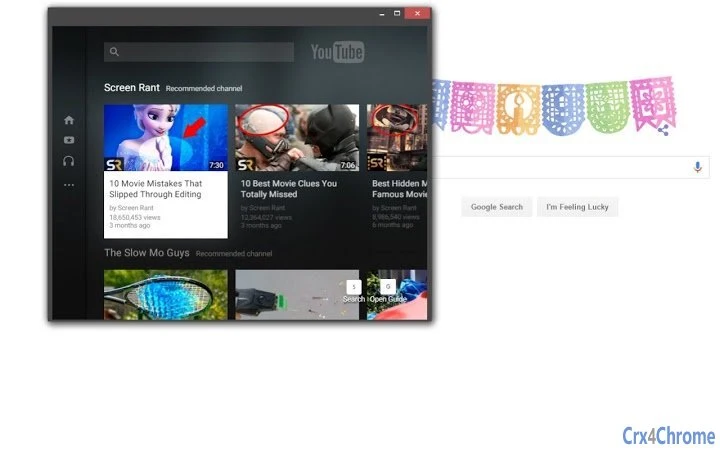
The software provides a dedicated, always-on-top window for YouTube TV, designed to run independently of other applications. This desktop utility enables users to keep live TV content visible while working, browsing, or using other software. The primary purpose is to enhance multitasking by eliminating the need to switch between tabs or applications to view live broadcasts. It is particularly useful for professionals, content creators, and streamers who require continuous access to live programming without disrupting workflow.
The application is built for both Windows and Mac operating systems, offering cross-platform compatibility. It operates as a standalone window, allowing free positioning and full resizing, which supports flexible use across dual-monitor setups or cluttered desktop environments. Real-world scenarios include monitoring live news, sports events, or live shows while editing documents, coding, or managing social media. The developer did not provide additional background information.
Given the absence of system requirements or performance data, general software behavior patterns are assumed. The application is described as lightweight, suggesting minimal impact on system resources. It does not appear to require complex setup or ongoing maintenance, making it accessible to users of varying technical skill levels.
Key Features & Capabilities
- Always-on-Top Window – The core functionality ensures the YouTube TV window remains visible above all other open applications, ideal for continuous monitoring without interruption.
- Freely Positioned – Users can drag the window to any location on the screen, enabling optimal placement for dual-monitor use or minimal screen obstruction.
- Fully Resizable – The window can be adjusted to any size, allowing users to balance visibility and screen real estate based on their needs.
- Standalone Desktop Application – Operates independently from web browsers, reducing dependency on Chrome or other platforms and enhancing stability during extended use.
- Cross-Platform Support – Available for both Windows and Mac, supporting a wide range of devices and operating systems, including Mac Intel and Apple Silicon models.
These features support practical workflows such as live event tracking during video editing, monitoring breaking news while writing, or following sports scores while working on spreadsheets. The ability to keep content visible without tab switching improves focus and reduces workflow disruption. The application’s lightweight nature suggests efficient operation, though exact performance metrics were not specified.
User Interface, Workflow & Performance
The user interface is designed around simplicity and functionality, centered on a single, resizable window that displays YouTube TV content. Navigation is minimal, relying on standard window controls (drag, resize, close) and direct access to the YouTube TV stream. There are no visible menus or complex settings, which contributes to a streamlined experience. The workflow is straightforward: launch the app, and the YouTube TV window appears immediately in the chosen position.
Given the absence of detailed performance data, general software behavior patterns are used for evaluation. The application is expected to run smoothly on modern systems due to its lightweight design and minimal resource demands. No reported issues with stability or crashes were mentioned. The developer did not specify resource usage details, such as CPU or RAM consumption. However, the 20 MB installation size suggests low overhead. The app is likely optimized for background operation without interfering with other tasks.
Compatibility & System Requirements
The software is compatible with Windows and Mac operating systems, supporting both Intel and Apple Silicon-based Mac hardware. It is available in version 1.0, with an installation size of 20 MB. The developer did not specify exact system requirements, including minimum CPU, RAM, or disk space needs. Compatibility with specific macOS versions such as Big Sur, Monterey, Ventura, and Sonoma is implied but not confirmed.
For Windows users, support for Windows 10 and Windows 11 is likely, though not explicitly stated. The app does not require a specific browser or plugin, functioning as a standalone application. No hardware-specific dependencies were mentioned. The developer did not provide additional system requirements, so users should ensure their devices meet general desktop application standards. Performance observations are based on general software behavior patterns.
Pros and Cons
Pros
- Always-on-top functionality enhances multitasking efficiency
- Freely movable and fully resizable window improves usability
- Lightweight design with only 20 MB installation size
- Standalone desktop app reduces browser dependency
- Available for both Windows and Mac, including Apple Silicon models
Cons
- Exact system requirements were not listed
- No detailed information on performance or resource usage
- Developer background and support channels are not disclosed
- Limited to YouTube TV streaming; no additional media or features
- App may not support advanced customization or playback controls
FAQ Section
Is this app compatible with Mac Apple Silicon (M1, M2, M3)?
Yes, the software is designed to run on Mac systems with Intel and Apple Silicon processors, including M1, M2, and M3 chips.
Can I use this app without a YouTube TV subscription?
The app requires an active YouTube TV subscription to access live and on-demand content. It does not provide access to free or unlicensed streaming.
Does the app work offline?
No, the application requires an active internet connection to stream YouTube TV content. It cannot function without online access.
Is the app secure and safe to use?
The app operates as a desktop utility and does not collect user data. It is designed to run securely within standard system permissions.
How often are updates released?
Update frequency is not specified. Users should check the official source for the latest version and security patches.
Final Thoughts + CTA
This lightweight desktop application delivers a focused, efficient solution for users who want to keep YouTube TV visible during multitasking. Its always-on-top, freely positioned, and fully resizable window offers a seamless experience across both Windows and Mac platforms. While it lacks advanced features and detailed system information, its simplicity and cross-platform availability make it a practical tool for professionals, streamers, and content consumers.
Despite limited transparency around performance and developer details, the app’s minimal footprint and straightforward design suggest reliability. For users seeking a dedicated YouTube TV window without browser overhead, this tool provides a clear advantage. It is especially beneficial in dynamic work environments where live content must be monitored continuously.
Download Always-on-Top YouTube TV Window now
Guides & Tutorials for AOT YouTube TV App for Chrome
How to install AOT YouTube TV App for Chrome
- Click the Preview / Download button above.
- Once redirected, accept the terms and click Install.
- Wait for the AOT YouTube TV App for Chrome download to finish on your device.
How to use AOT YouTube TV App for Chrome
This software is primarily used for its core features described above. Open the app after installation to explore its capabilities.
User Reviews for AOT YouTube TV App for Chrome 0
No reviews found





